Software for testing, adjusting & balancing

From first reading
to final TAB report.

Air and hydronic balancing. Field readings, drawings, deficiencies and report handoff in one place.

Demonstration project

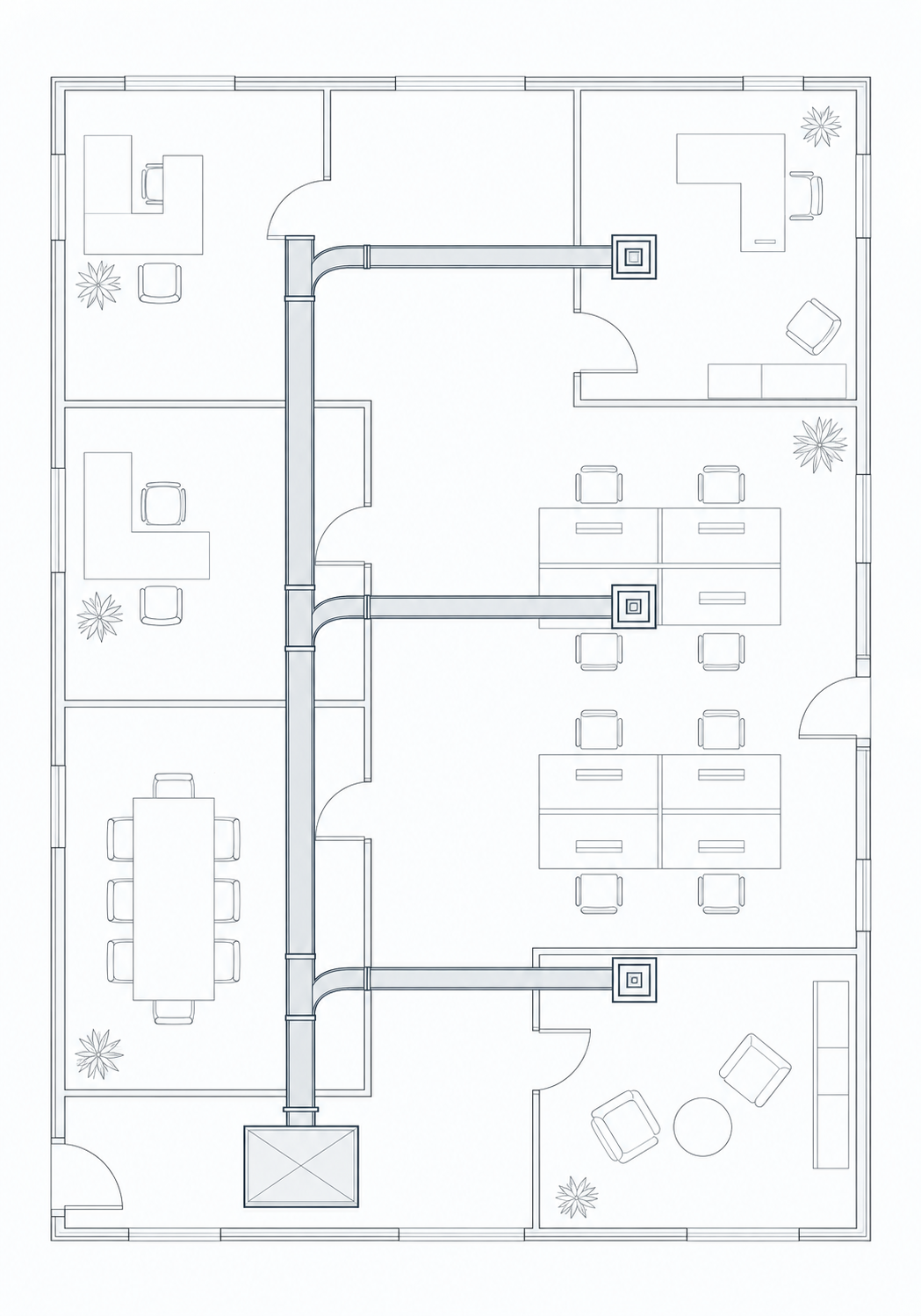
AHU-1 · Air balance

Change a measured reading
Fictional readings in CFM. Edit measured readings to see variance. Example tolerance is plus or minus ten percent.
TerminalDesign CFMMeasured CFMVariance
A-1420-2%
A-2Needs review380-21%
A-3350+2%
1,070 / 1,150 CFM

Example tolerance ±10%

Illustrative office duct plan connecting a supply branch to three terminals.
Illustrative product view · Try a measured reading

Re-letter the branch

Every terminal in this example follows the branch letter.

  • Air balancing
  • Hydronic balancing
  • Deficiency tracking
  • TAB reports

The drawing. The reading. The report.

Drawing referenceCAV-A A-2One terminal. One place for its readings.

Record in the field

Take the reading against the terminal on your drawing.

Example field reading302 / 380 CFM−21% · Needs review at ±10% tolerance

Keep deficiencies visible

See what’s outside tolerance and keep the follow-up with the job.

Report handoffReadings + notesEquipment, deficiencies and field context.

Carry it into the report

Bring the field sheet and its notes into report preparation.

Why TAB Space?

Less switching.
More balancing.

A TAB job has enough moving parts. Keeping your software in step shouldn’t be another one.

  1. One job, scattered across apps.

    Drawings in a PDF editor. Readings in a spreadsheet. Deficiencies in email. Keep the job together as you move between tasks.

  2. Readings that get typed twice.

    Keep field readings connected to the drawing and report work, instead of reconciling another copy at the end of the week.

  3. Site photos that stay with the job.

    Keep equipment photos and installation conditions organized by project, alongside the work they explain.

  4. Tools chosen for TAB work.

    Field entry, markup, deficiencies and report preparation—without making a broad, general-purpose platform the centre of your day.

A workspace that fits your day

In your browser.
On Windows.

Work in the browser or the dedicated Windows application.

  • Browser-based workspace
  • Windows application
  • Android & iOS applications and support Planned

For professional TAB agencies

Your agency.
Your reporting format.

Working to AABC, CAABC or NEBB reporting requirements? Bring your agency’s format to the Founder Access walkthrough.

We review agency-specific reporting formats with your team during setup. Your report requirements belong in the conversation from day one.

Bring your reporting workflow to Founder Access

Founder Access

Bring your crew.
Bring your TAB workflow.

Access opens October 1. Apply now and tell us about your crew and how you work.

  1. 1Apply
  2. 2Fit review
  3. 3Access invitation

Review pricing, included seats and guided setup. Applying is not payment or a commitment to join. Access is by invitation.

Tell us about your TAB team
Your TAB work

TAB Space is independent and is not affiliated with or endorsed by AABC, CAABC or NEBB.

Straight answers

Before you apply.

Who is Founder Access for?

TAB contractors, field technicians, crew leads and the people responsible for the final report. Tell us about your air balancing, hydronic balancing, duct leakage testing or commissioning work so we can review the fit.

What happens after I apply?

We review your application and contact you about your team’s workflow. Selected teams receive an access invitation. Submitting an application does not create an account or guarantee access.

What does participation involve?

Founder Access is an early access program. We’ll discuss the workflows available to your team, onboarding, feedback and any commercial terms before you decide to take part.

Can we work without a signal?

TAB Space is built around offline field entry, with drawings and job information prepared before going on site. We’ll walk through the supported offline workflows and device requirements with your team before access.

Is the example on this page the actual application?

It’s an interactive illustration using fictional readings. Try changing a measured value or selecting a terminal on the drawing. The example uses a ±10% tolerance; your project requirements and professional judgment determine the appropriate tolerance on a real job.

Privacy

Your application stays private.

We collect the contact details, company information, team size, type of TAB work and optional message you choose to send so we can review and respond to your Founder Access application.

The destination address is kept on the server. Automatic abuse screening uses a short-lived challenge, limited request metadata and bounded rate controls. We do not sell application data or use it for advertising profiles.

Application content is retained only as long as reasonably needed to respond, preserve delivery evidence and meet legitimate business or legal obligations.

Terms

A clear, respectful preview.

This public site introduces TAB Space and accepts Founder Access applications. Applying does not create an account, guarantee admission or commit you to a purchase. Access and any commercial terms are discussed separately.

The product is being refined. The illustrative sheet uses fictional readings and an example tolerance; it is not certification, professional engineering advice or a promise of a specific release date.

TAB Space is independent and is not affiliated with or endorsed by AABC, CAABC or NEBB.

Founder Pack

Access opens October 1 · Limited founding-team intake

A proper start
for your TAB team.

Two months to put the full workspace to work, with your own company landing page and help getting started.

  • Room to keep going.

    At the end of the founder period, you can continue with full access to all features, including future planned releases as they become available.

  • Every available feature, for two months.

    Full access to the TAB Space workspace for your team throughout the Founder Pack period.

  • A landing page of your own.

    Your company’s own landing page with a login to TAB Space, on a dedicated company subdomain.

    AcmeTAB.tabspace.caExample company address
  • Help getting the team settled in.

    Guided setup and a walkthrough of your reporting format, so your first project starts with the right foundations.

  • A direct conversation as you use it.

    Share feedback and feature requests directly with us. We’ll incorporate what we learn from founding teams as we refine the workspace and develop new features.